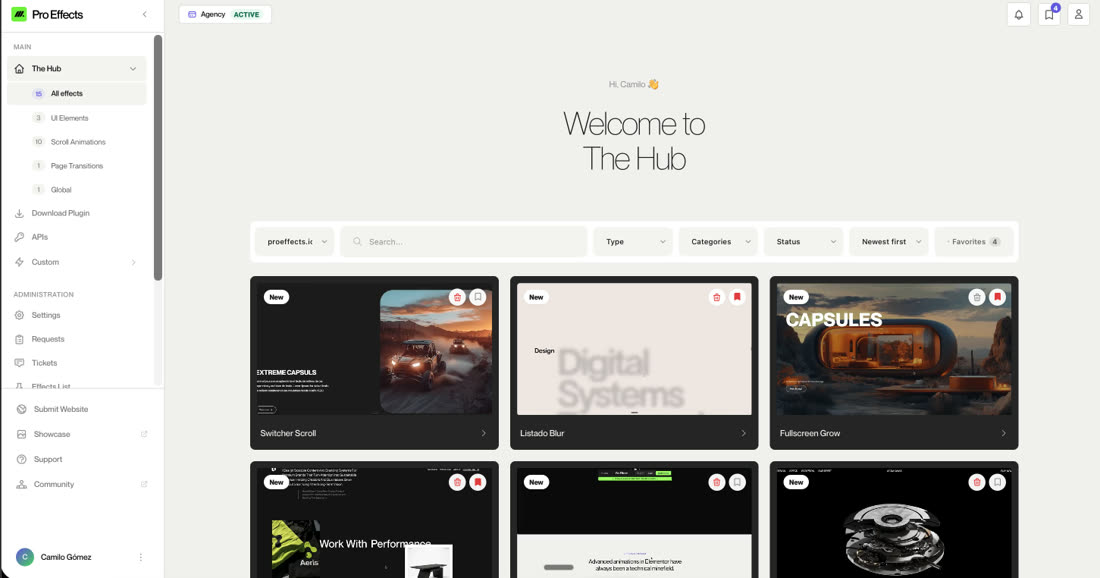
What's Inside
A growing library of production-ready GSAP effects, scroll animations, and UI widgets — designed to drop into any Elementor site without code.
Discover our library of 69+ ready-to-go effects, designed to be installed, configured, and published. Drag-and-drop into Elementor, or request a custom effect built exclusively for your project.
Install in seconds
Download, activate, plug in your API key, and start dragging effects into your Elementor editor. No complex configuration, no build steps.
Zero performance cost
Only the scripts for effects you actually use are loaded. Pages without Pro Effects widgets load zero extra bytes.
Always growing
New effects and UI components are added regularly. Your license includes every future addition — no upsells.
No conflicts
Isolated architecture per widget means Pro Effects won't break your existing plugins, theme, or Elementor setup.
Latest Effects
Take a peek inside our ever-growing collection. We've added 75 effects, with the latest addition 8 weeks ago.
Horizontal Slider
SCROLL ANIMATIONS
Float Image
IMAGE
Theme Zones
SCROLL ANIMATIONS
Listado Blur
SCROLL ANIMATIONS
Everything you need.
Nothing you don't.
Pro Effects was built from scratch for Elementor — not adapted from another builder. Every feature is designed around the drag-and-drop workflow you already know.
Smart Filters
Filter effects by type, category, status, and more. Find exactly what you need in seconds — no endless scrolling.
Live Previews
Every effect includes an interactive HTML preview so you can see exactly how it behaves before installing.
One-Click Install
Install any effect directly from The Hub. It appears in your Elementor panel instantly — no page reload needed.
Hub-Wide Search
Find any effect instantly with a powerful search bar. Filter by name, category, or type — no scrolling through endless lists.
Save Resources
Bookmark your favorite effects for quick access. Save, organize, and build your own curated library inside The Hub.
Documentation
Every effect includes detailed documentation — how to use it, use cases, and configuration options. All accessible from The Hub.
From install to live
in under 5 minutes.
Install the plugin
Download from your dashboard, upload to WordPress, and activate. That's it.
Browse The Hub
Explore the full library of effects. Filter by scroll animations, UI elements, or page transitions.
Drag into Elementor
Each effect is an Elementor widget. Drag it to your canvas, configure the visual controls, publish.